Billing & Plans
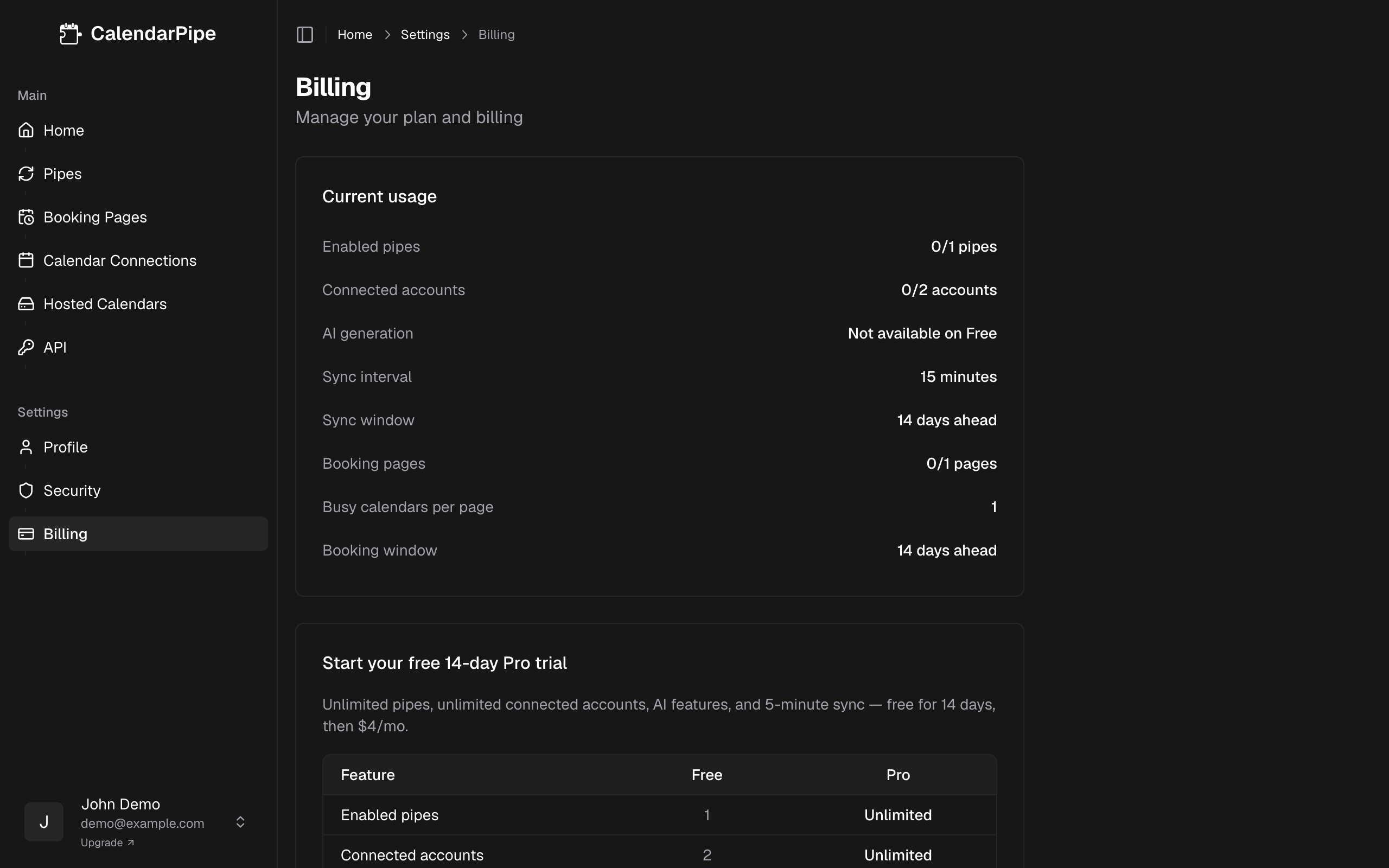
CalendarPipe offers Free and Pro as self-serve plans, plus Business for batch account orders (contact-only, managed manually). The Free plan gives you the essentials to try out calendar syncing, while Pro unlocks the full power of CalendarPipe with unlimited connected accounts, faster sync intervals, and advanced features.
Plan Comparison
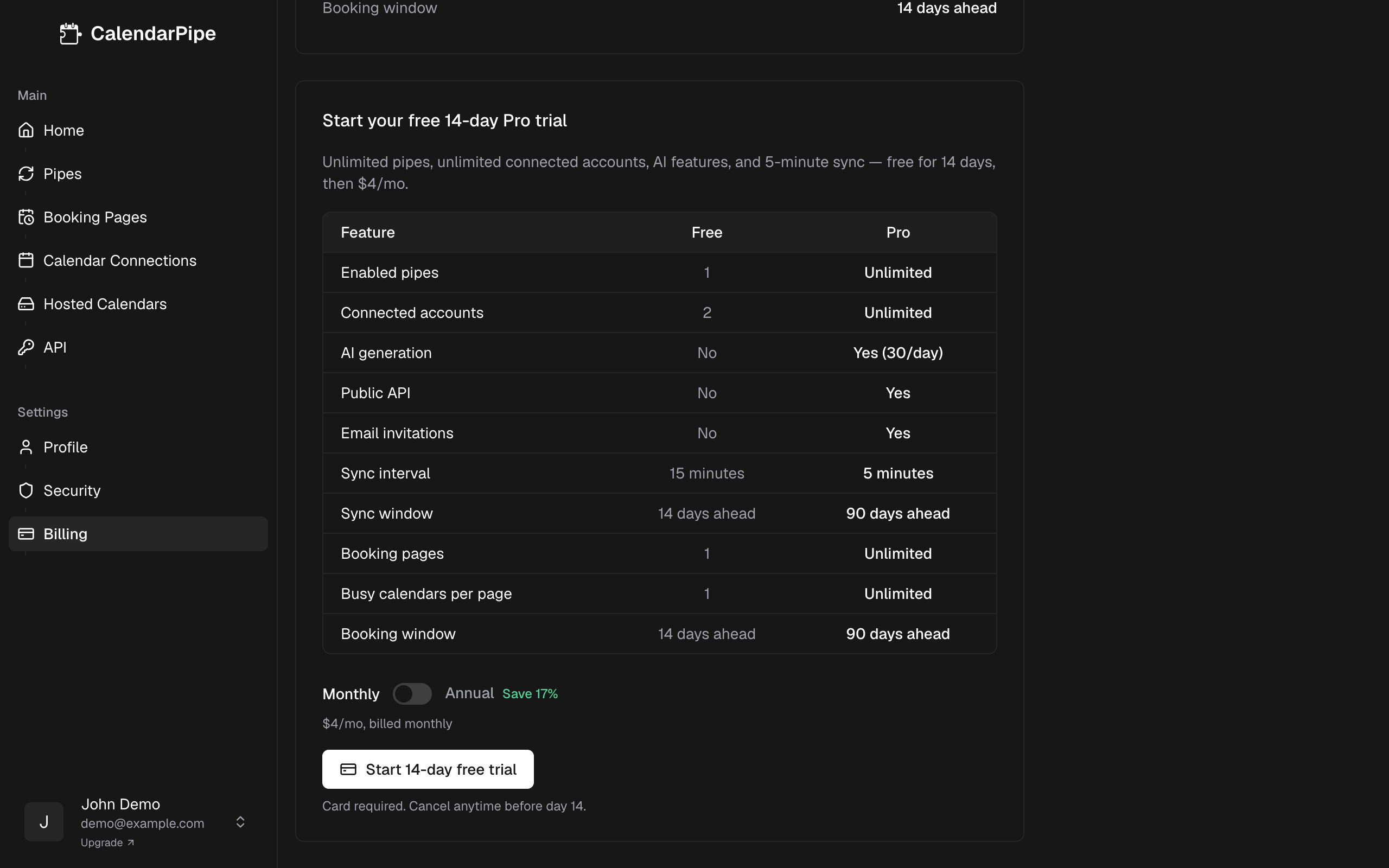
| Feature | Free | Pro |
|---|---|---|
| Connected accounts | 2 | Unlimited |
| Pipes | 1 | Unlimited |
| Sync interval | 15 minutes | 5 minutes |
| Sync window (guaranteed) | 14 days | 90 days |
| Adjustable sync window | No | Up to 180 days |
| AI generation | No | Yes (30/day) |
| Public API access | No | Yes |
| ICS feed connections | Yes | Yes |
| Email invitation delivery | No | Yes |
| Hosted calendars | No | Yes |
| Remove CalendarPipe attribution | No | Yes |
| Support | Community | Priority |
A connection is one account you sign in to — Google, Microsoft, or Apple — or one ICS feed. Calendars inside a connected account are unlimited on every plan; see Connectors.
Pricing
- Free -- Free forever. No credit card required.
- Pro -- $4/month billed monthly, or $3.33/month billed annually at $40/year (save ~17%).
- Business -- Contact us for pricing. Batch account orders, personal support, and custom development or roadmap influence. Not available through self-serve checkout — use Contact or the Contact us button on Pricing.
Switching to annual billing saves you $8/year compared to monthly billing.
How to Upgrade
- Navigate to Settings > Billing in the CalendarPipe sidebar.
- Click Start 14-day free trial (first-time users) or Upgrade to Pro (returning users).
- Complete payment in the checkout that opens.
- Pro features are available immediately — no need to log out or refresh.
14-Day Free Trial
First-time subscribers can start a 14-day free trial of Pro. The flow is the same as a regular upgrade, with two differences:
- A payment method is collected during checkout but not charged until day 14.
- All Pro features are unlocked immediately for the duration of the trial.
On day 14, your card is charged automatically at the rate you selected (monthly or annual) and the trial converts to a regular Pro subscription. Cancel any time before day 14 from Settings > Billing > Manage Billing and you won't be charged. You keep Pro features through the end of your 14-day window.
Each account is eligible for one trial, ever. Cancelled-and-returning subscribers see the standard Upgrade to Pro button (no second trial).
Managing Your Subscription
Once subscribed to Pro, you can manage your subscription from the Billing settings page:
- View current plan -- See which plan you are on and when your next billing date is.
- Switch billing period -- Change between monthly and annual billing at any time. When switching to annual, you pay the prorated difference. When switching to monthly, the change takes effect at the end of your current annual period.
- Cancel subscription -- Cancel your Pro subscription at any time. Cancellation takes effect at the end of your current billing period -- you keep all Pro features until then.
When your Pro subscription ends, your account reverts to the Free plan. See Free Plan Limits below for exactly what changes.
Free Plan Limits
The Free plan includes 2 connected accounts (an ICS feed counts as one) and 1 enabled pipe. When you reach these limits:
- Connected accounts -- You cannot connect a 3rd account or ICS feed. You will need to disconnect an existing one or upgrade to Pro.
- Pipes -- You can still create additional pipes, but only 1 can be enabled at a time. Disable your current pipe or upgrade to Pro to enable another.
Nothing is deleted when you cancel Pro. Whatever the Free plan does not cover is switched off instead, and re-subscribing lets you switch it back on:
- Over the Free limits -- your 2 oldest connections and your oldest pipe keep running; the rest are disabled.
- Email invitation delivery -- pipes that deliver by email invitation are disabled even if you are within the 1-pipe limit, and cannot be re-enabled until you re-subscribe.
You also cannot create new connections until you are back under the Free plan connection limit (2). Extra pipes can still be created while disabled; enabling stays capped at 1 on Free.