Code Editor
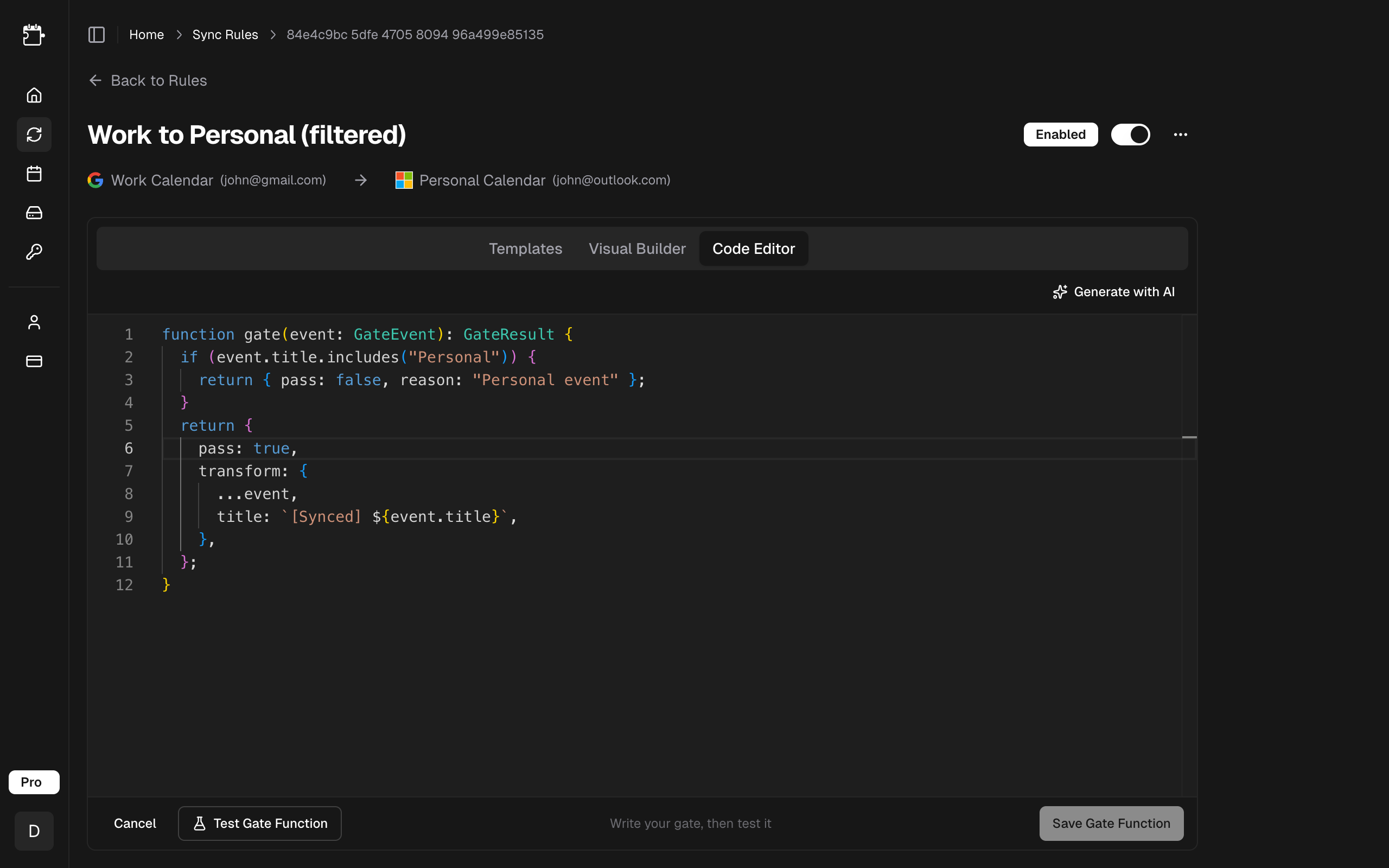
The Code Editor is a Monaco-based TypeScript editor built into CalendarPipe. It provides full autocompletion for GateEvent and GateResult types, letting you write gate functions with the same editing experience as VS Code.
Getting Started
- Navigate to a sync rule's gate function settings
- Select the Code Editor tab
- The editor opens with your current gate function code (or the default "Pass All" template)
- Type definitions for
GateEventandGateResultare injected automatically -- you get full autocompletion as you type
Function Signature
Every gate function must be named gate and accept a GateEvent parameter. It must return a GateResult object or a boolean.
function gate(event: GateEvent): GateResult | boolean {
  // Your logic here
  return { pass: true };
}
The event parameter contains all properties of the calendar event being synced. See the Property Reference for the full list of available properties and methods.
Returning Results
Gate functions support three return patterns:
1. Simple Boolean
The simplest approach -- return true to pass or false to block:
function gate(event: GateEvent): boolean {
  return event.isWeekday;
}
2. GateResult with Reason
Return an object with pass and an optional reason (max 200 characters). The reason appears in sync logs when an event is blocked:
function gate(event: GateEvent): GateResult {
  if (event.matches('confidential')) {
    return { pass: false, reason: 'Blocked confidential event' };
  }
  return { pass: true };
}
3. GateResult with Transform
Return a transform object to modify event properties on the synced copy. The original event on the source calendar is never changed:
function gate(event: GateEvent): GateResult {
  return {
    pass: true,
    transform: {
      title: `[Work] ${event.title}`,
      showAs: 'free',
    },
  };
}
Transform Options
When passing events, you can override these properties on the synced copy:
| Field | Type | Max Length | Description |
|---|---|---|---|
title | string | 500 chars | Replace the event title |
description | string | 5,000 chars | Replace the event description |
location | string | 500 chars | Replace the event location (empty string clears it). |
visibility | 'default' | 'public' | 'private' | -- | Change event visibility |
showAs | 'free' | 'busy' | -- | Change free/busy status |
reminders | false | number | 1–40320 | Alerts on the synced copy: false for none, a number for minutes of warning. |
color | colour name | -- | Colour the synced copy (Google only). |
preBufferMinutes | integer | 0–60 | Start the synced event earlier (pre-event buffer). Ignored for all-day events. |
postBufferMinutes | integer | 0–60 | End the synced event later (post-event buffer). Ignored for all-day events. |
Transforms only apply to the synced copy on the target calendar. The original event is never modified.
Formatting Your Code
The editor toolbar includes a Prettify button that reformats your gate function — consistent indentation, quotes, spacing, and line wrapping — using the same Prettier style as the rest of CalendarPipe. Formatting runs entirely in your browser, so it's instant and never leaves your machine.
Your code is also prettified automatically whenever you run a test (or re-test), so the editor always lands on tidy code after a dry run.
If your code has a syntax error, formatting is skipped and your code is left untouched — fix the error, then prettify or test again.
Testing Before Saving
The editor includes a Test button that runs your gate function against sample events before you save. This helps catch errors early.

When you click Test:
- CalendarPipe runs your function against a set of sample events
- Each event shows whether it was passed or blocked, along with any transforms applied
- Events that fail validation are highlighted with an error
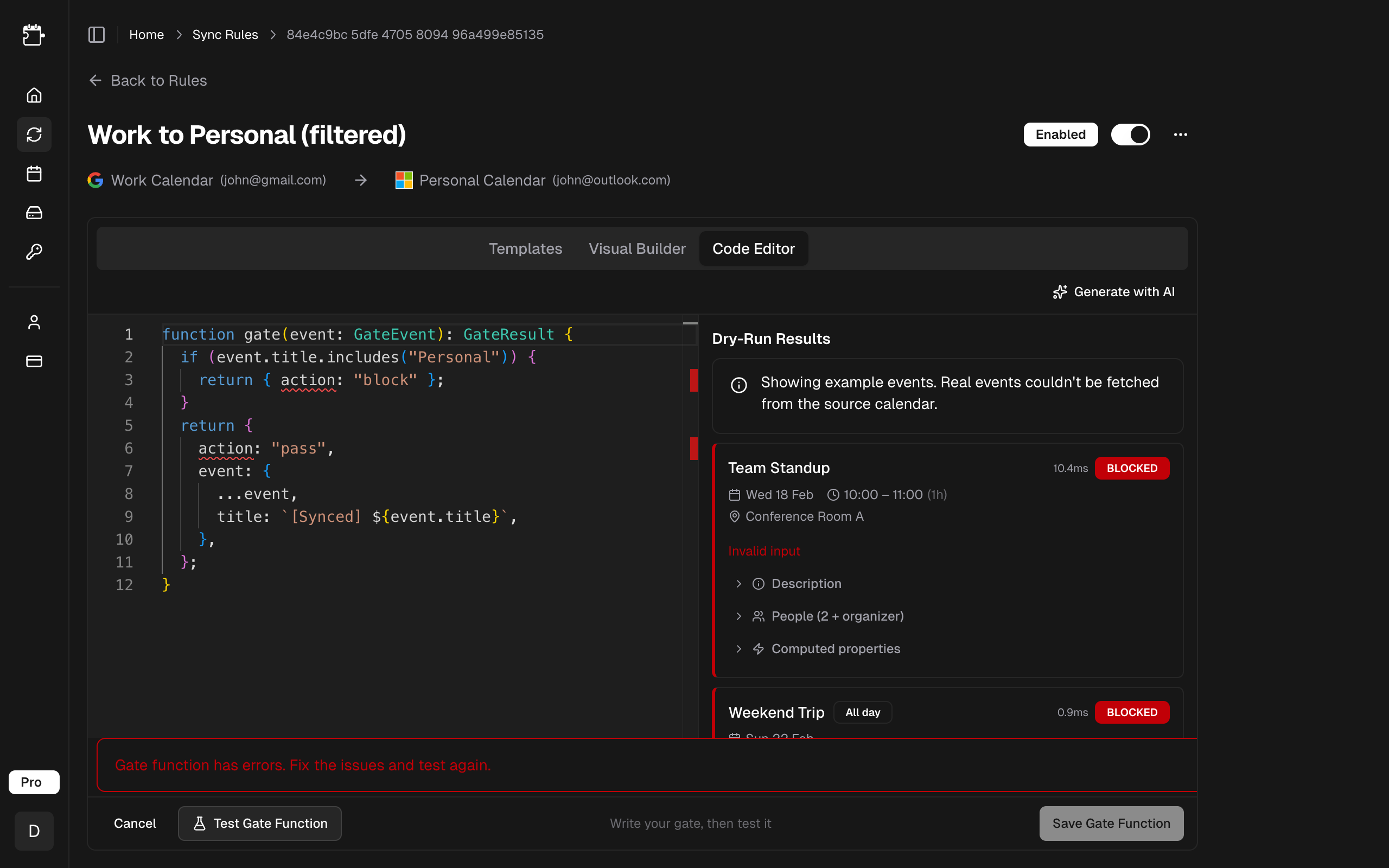
Always test your gate function before saving, especially after making changes. The test run uses real events from your source calendar so you can see exactly how your function behaves.
Common Examples
All examples below are complete, copy-pasteable gate functions.
Block Events Matching a Keyword
Block any event with "internal" in the title or description:
function gate(event: GateEvent): GateResult {
  if (event.matches('internal')) {
    return { pass: false, reason: 'Blocked internal event' };
  }
  return { pass: true };
}
Prefix All Event Titles
Add a "[SYNCED]" prefix to every event title:
function gate(event: GateEvent): GateResult {
  return {
    pass: true,
    transform: {
      title: `[SYNCED] ${event.title}`,
    },
  };
}
Block Events Outside Business Hours
Only sync events that occur during business hours (9 AM - 5 PM, weekdays):
function gate(event: GateEvent): GateResult {
  if (!event.isWeekday) {
    return { pass: false, reason: 'Weekend event' };
  }
  if (event.hour < 9 || event.hour >= 17) {
    return { pass: false, reason: 'Outside business hours' };
  }
  return { pass: true };
}
Redact Events from Specific Attendees
Pass all events, but redact details when a specific person is an attendee:
function gate(event: GateEvent): GateResult {
  if (event.hasAttendee('ceo@company.com')) {
    return {
      pass: true,
      transform: {
        title: 'Executive Meeting',
        description: 'Details redacted',
        location: '',
      },
    };
  }
  return { pass: true };
}
Filter by Duration
Only sync meetings that are 30 minutes or longer, block quick check-ins:
function gate(event: GateEvent): GateResult {
  if (event.durationMinutes < 30) {
    return { pass: false, reason: 'Too short' };
  }
  return { pass: true };
}
Add a Buffer Around Meetings
Pad every synced event with 15 minutes before and after so meetings never sit back-to-back on the target calendar:
function gate(event: GateEvent): GateResult {
  return {
    pass: true,
    transform: {
      preBufferMinutes: 15,
      postBufferMinutes: 15,
    },
  };
}
Combine Multiple Conditions
Block personal events, redact 1:1 meetings, and add a prefix to everything else:
function gate(event: GateEvent): GateResult {
  // Block personal events entirely
  if (event.matches('personal')) {
    return { pass: false, reason: 'Personal event' };
  }

  // Redact 1:1 meetings for privacy
  if (event.attendeeCount <= 2) {
    return {
      pass: true,
      transform: {
        title: 'Meeting',
        description: '',
        location: '',
      },
    };
  }

  // Add prefix to all other events
  return {
    pass: true,
    transform: {
      title: `[Team] ${event.title}`,
    },
  };
}
Related
- Property Reference — every property and helper available on
GateEvent. - Templates — start from a preset instead of writing from scratch.
- Cookbook — copy-pasteable recipes for common patterns.